CustomTkinter ExplainedA Complete BeginnerFriendly Guide to Modern Python GUI Development
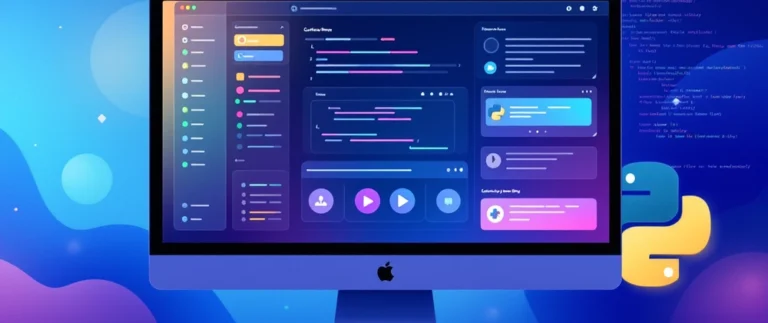
CustomTkinter is a modern and powerful Python library that is designed to simplify and enhance desktop GUI (Graphical User Interface) development. In the world of programming, user interface design plays a very important role because it directly affects how users interact with an application. Even if a program is powerful and feature-rich, users may not prefer it if the interface looks outdated or difficult to use. Traditional Python GUI development is mostly done using Tkinter, which is simple and beginner-friendly but has a major limitation: its design looks old-fashioned compared to modern applications. CustomTkinter solves this problem by building on top of Tkinter and adding modern UI components, beautiful themes, improved widgets, and better customization options. It allows developers to create professional-looking desktop applications using Python without needing advanced design skills or complex frameworks. This makes it an excellent choice for beginners who want to learn GUI development as well as developers who want to quickly build modern applications.
Understanding the Concept of GUI Development in Python
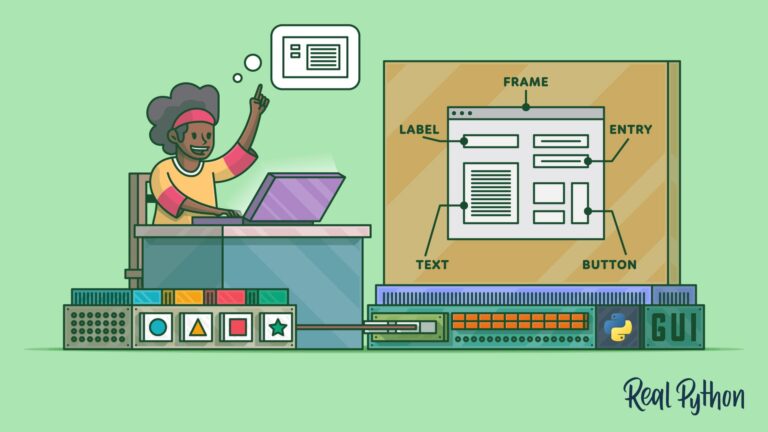
Before understanding CustomTkinter, it is important to understand what GUI development actually means. GUI stands for Graphical User Interface, which is the visual part of a software application that users interact with. Instead of writing commands in a terminal or command line, users interact with visual elements such as buttons, text boxes, menus, sliders, and windows. GUI applications are everywhere in daily life, including calculators, text editors, file managers, web browsers, and mobile apps. In Python, GUI development is done using libraries like Tkinter, PyQt, Kivy, and wxPython. Each library has its own strengths, but Tkinter is the most commonly used because it comes built into Python. However, Tkinter’s biggest drawback is its outdated appearance. CustomTkinter was created to solve this exact problem by modernizing Tkinter’s look while keeping its simplicity intact.
What is CustomTkinter?
CustomTkinter is an open-source Python library that extends Tkinter and provides modern UI elements for building desktop applications. It replaces traditional Tkinter widgets with redesigned versions that look clean, modern, and user-friendly. Instead of plain buttons and basic entry fields, CustomTkinter provides rounded buttons, styled input fields, smooth frames, switches, sliders, and advanced layout components. The main goal of CustomTkinter is not to replace Tkinter completely but to improve its visual appearance and usability. This means developers can still use familiar Tkinter concepts such as windows, event handling, and layouts while enjoying a modern interface design. This combination of simplicity and modern design is what makes CustomTkinter so powerful and popular among developers.
Why CustomTkinter is Becoming So Popular
CustomTkinter has gained massive popularity in recent years because it solves a major problem in Python GUI development: outdated design. In today’s digital world, users expect applications to look modern, clean, and responsive. If an application looks like it was designed decades ago, users may lose interest even if it works perfectly. CustomTkinter helps developers overcome this issue by providing modern UI components by default. Another reason for its popularity is ease of use. Developers do not need to spend hours designing UI elements from scratch because CustomTkinter already provides pre-styled widgets. This significantly reduces development time and effort. It is also very beginner-friendly, which makes it ideal for students and new programmers who want to learn GUI development without feeling overwhelmed.
Installation and Setup of CustomTkinter
Installing CustomTkinter is extremely simple and does not require any complex setup. It can be installed using Python’s package manager pip with a single command. Once installed, developers can import the library into their Python program and start building applications immediately. There are no additional dependencies or complicated configuration steps required. After installation, the basic structure of a CustomTkinter application includes creating a main window, adding widgets such as buttons, labels, and input fields, and running the application loop. Even beginners can build their first application within minutes, which makes it highly accessible for learning purposes.
Key Features of CustomTkinter
CustomTkinter comes with several powerful features that make it stand out from traditional Tkinter. One of the most important features is its modern design system. All widgets are designed with smooth edges, better spacing, and visually appealing layouts. Another major feature is theme support, which includes light mode, dark mode, and system mode. This allows applications to adapt to user preferences and operating system settings. CustomTkinter also provides improved widgets that are more functional and visually consistent compared to standard Tkinter components. These features combined make CustomTkinter a powerful tool for modern desktop application development.
Widgets in CustomTkinter
Widgets are the core building blocks of any GUI application, and CustomTkinter provides a wide range of modern widgets. Buttons in CustomTkinter are designed with smooth edges and interactive hover effects, making them more visually appealing. Labels are clean and easy to read, improving user experience. Entry fields are designed for better usability and are commonly used in forms, login pages, and data input applications. Sliders and switches provide modern alternatives to traditional input methods. Frames are used to organize content and structure the application layout. All these widgets work together to create a consistent and professional-looking interface.
Layout Management in CustomTkinter
Layout management is a very important aspect of GUI development because it determines how elements are arranged on the screen. Poor layout design can make an application confusing and difficult to use. CustomTkinter provides improved layout control that helps developers organize widgets in a clean and structured way. Proper spacing, alignment, and grouping of elements make applications more user-friendly. This is especially important for complex applications like dashboards, settings panels, and data entry systems where multiple components need to be displayed in an organized manner.
Event-Driven Programming in CustomTkinter
CustomTkinter follows the event-driven programming model, which is a fundamental concept in GUI development. In this model, the application waits for user actions such as clicking a button, typing in a field, or moving a slider. When an event occurs, the program responds by executing a specific function. This makes applications interactive and dynamic. For example, when a user clicks a “Submit” button, a function can process the input data and display a result. CustomTkinter simplifies this process, making it easier for beginners to understand how interactive applications work.
Real-World Uses of CustomTkinter
CustomTkinter is widely used in real-world applications due to its simplicity and modern appearance. Developers use it to build calculators, file management tools, admin dashboards, automation scripts with graphical interfaces, data entry systems, and educational applications. It is especially useful for creating internal business tools where speed and functionality are more important than complex animations. Freelancers and developers also use CustomTkinter to quickly build client projects because it allows fast development while still producing professional-looking results.
Advantages of CustomTkinter
CustomTkinter offers many advantages for developers. It is simple and easy to learn, making it ideal for beginners. It provides modern UI design without requiring advanced UI/UX skills. It is lightweight and fast, which means applications run smoothly even on low-end systems. It also supports theme switching, which improves user experience. Another major advantage is productivity, as developers can build applications much faster compared to designing UI manually.
Limitations of CustomTkinter
Although CustomTkinter is powerful, it does have some limitations. It is not suitable for highly complex applications that require advanced animations, graphics, or deeply customized interfaces. Frameworks like PyQt or Kivy are better for such use cases. Another limitation is that it still depends on Tkinter, which means it inherits some of its structural constraints. While the design is modern, the core system remains the same.
Why Beginners Should Learn CustomTkinter
CustomTkinter is an excellent choice for beginners because it provides a smooth learning curve. It helps new developers understand GUI concepts such as event handling, widget placement, and application structure in a simple and visual way. It also allows beginners to build real projects quickly, which boosts confidence and improves learning speed. Students can use it to create portfolio projects that demonstrate their programming skills in a practical and impressive way.
Performance of CustomTkinter
One of the strongest points of CustomTkinter is its performance. Since it is built on Tkinter, it remains lightweight and efficient. Applications built using CustomTkinter do not require high system resources and can run smoothly on most computers. This makes it ideal for small tools and utility applications that need to be fast and responsive.
Future of CustomTkinter
The future of CustomTkinter looks promising because more developers are moving toward modern desktop application design. As demand for simple yet attractive GUI frameworks increases, CustomTkinter is expected to grow even more in popularity. Its combination of simplicity, modern design, and efficiency makes it a strong choice for future Python GUI development.
FAQs
What is CustomTkinter used for?
CustomTkinter is used to build modern desktop GUI applications in Python with improved design and usability.
Is CustomTkinter better than Tkinter?
Yes, CustomTkinter is better in terms of modern design and user experience, but both are similar in functionality.
Is CustomTkinter good for beginners?
Yes, it is very beginner-friendly and easy to learn.
Can I build real applications using CustomTkinter?
Yes, many real-world tools like dashboards and automation apps are built using it.
Does CustomTkinter support dark mode?
Yes, it supports light, dark, and system themes.
Is CustomTkinter free?
Yes, it is completely free and open-source.
What are the limitations of CustomTkinter?
It is not suitable for very advanced or animation-heavy applications.
Conclusion
CustomTkinter is a modern Python GUI library that enhances Tkinter by adding beautiful design elements, improved widgets, and theme support while maintaining simplicity and ease of use. It is perfect for beginners who want to learn GUI development and for developers who want to build modern desktop applications quickly. Its lightweight nature, modern appearance, and ease of use make it one of the best tools available in Python for GUI development today. Whether you are building simple tools, educational projects, or professional applications, CustomTkinter provides everything needed to create clean, modern, and user-friendly interfaces.